
How Surge is Organised
Surge organizes everything into three levels: Platform, Account, and User. Understanding this hierarchy will help you make sense of the API, because most endpoints are scoped to one of these levels.
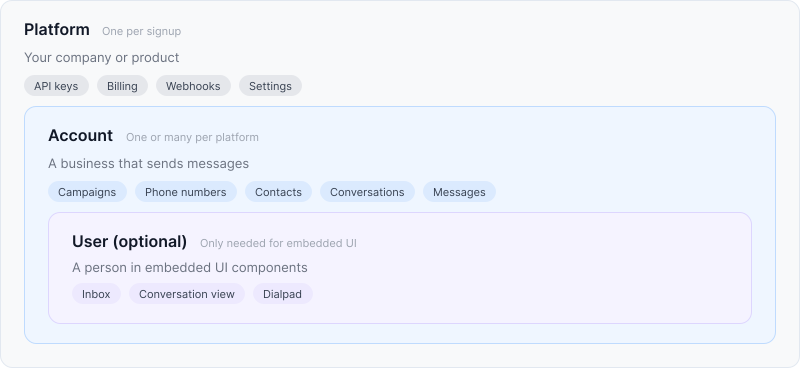
Platform is your company or product. You get one when you sign up. Your API keys, billing configuration, webhook endpoints, and settings all live at the platform level. This means a single API key can manage everything underneath it.
Account is the business entity that sends messages. It holds your campaigns, phone numbers, contacts, conversations, and messages. If you're a single developer or a small team, you'll have one account and that's all you need. If you're a SaaS platform registering brands for your own customers, you create one account per customer to keep compliance, billing, and message history isolated. See One Account per Customer for that pattern.
User is optional. You only need Users if you're building with Surge's embedded UI components (inbox, conversation view, dialpad). A User represents a person inside an account who sends and receives messages through those components. If you're calling the API directly from your backend, you can skip Users entirely.
Before your account can send messages at scale, you'll need to register a campaign through The Campaign Registry (TCR) or, for toll-free numbers, through a separate verification process. Register Your Business covers both paths.
Two kinds of "user"
This is the most common source of confusion for new developers, so it's worth being explicit.
| Dashboard User | End User | |
|---|---|---|
| What they are | A person who logs in to hq.surge.app to manage API keys, billing, and webhooks | A person provisioned via the API, shown inside embedded UI components |
| Who creates them | They sign up or receive an invitation | You create them via POST /accounts/{account_id}/users |
| Where they appear | The Surge dashboard | Inside embeddable inbox and conversation components |
| Scope | Can belong to multiple platforms | Scoped to a single account |
The API reference uses "user" to mean End User throughout. If you're not using embedded components, you won't interact with End Users at all. For a full guide to provisioning them, see Working with End Users.
The API in brief
Surge is a REST API. All requests and responses are JSON.
Authenticate with a bearer token:
Authorization: Bearer sk_live_...Account-scoped endpoints take the account ID in the request path. Because your API key is platform-scoped, this is how you target a specific account:
POST /accounts/acct_01jrzhe8d9enptypyx360pcmxj/messagesThe base URL is https://api.surge.app. Official SDKs are available for Python, TypeScript, Ruby, and Elixir with pagination helpers, error handling, and webhook signature verification built in.