
Inbox Component
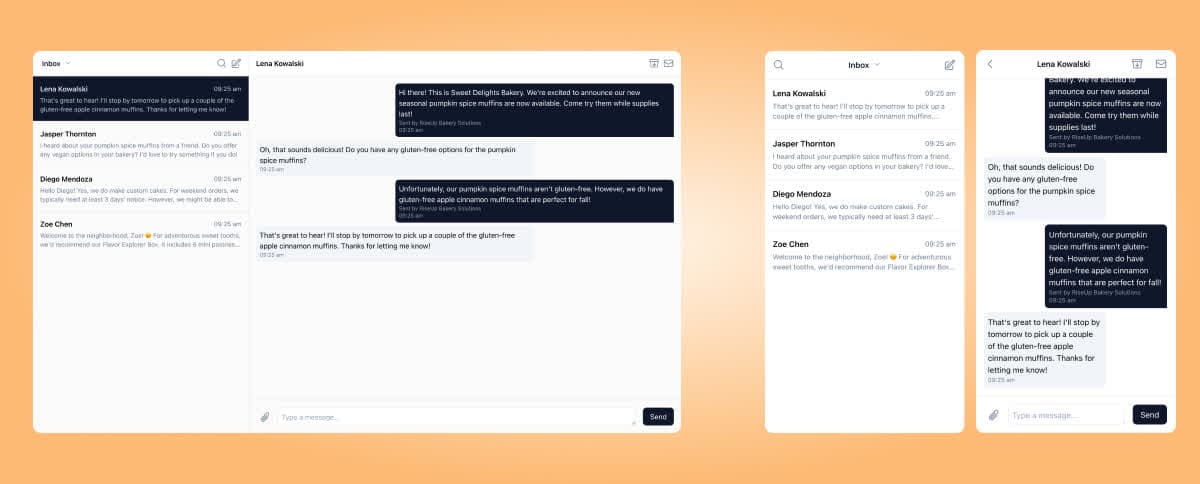
The Inbox component shows a list of all conversations for the current End User. It handles loading, pagination, and real-time updates automatically.
Mount the component
<script src="https://embed.surge.app/v1/embed.js"></script>
<div id="surge-inbox"></div>
<script>
  SurgeEmbed.mount("inbox", {
    target: document.getElementById("surge-inbox"),
    token: "YOUR_USER_JWT",
  });
</script>
Generate the JWT server-side on each page load. See Embeddable UI Overview for authentication options.
Options
| Option | Type | Required | Description |
|---|---|---|---|
target | HTMLElement | Yes | The DOM element to mount the component into |
token | string | Yes | A signed JWT for the current End User |
onConversationSelect | function | No | Callback when the user taps a conversation; receives the conversation object |
theme | object | No | Custom color and font overrides |
Handling conversation selection
If you want to navigate to a conversation view when the user taps a thread, provide an onConversationSelect callback:
SurgeEmbed.mount("inbox", {
  target: document.getElementById("surge-inbox"),
  token: "YOUR_USER_JWT",
  onConversationSelect: (conversation) => {
    // Navigate to /conversations/:id in your app
    window.location.href = `/conversations/${conversation.id}`;
  },
});
Unmounting
To clean up the component (e.g., when navigating away):
const inbox = SurgeEmbed.mount("inbox", { ... });
inbox.unmount();