
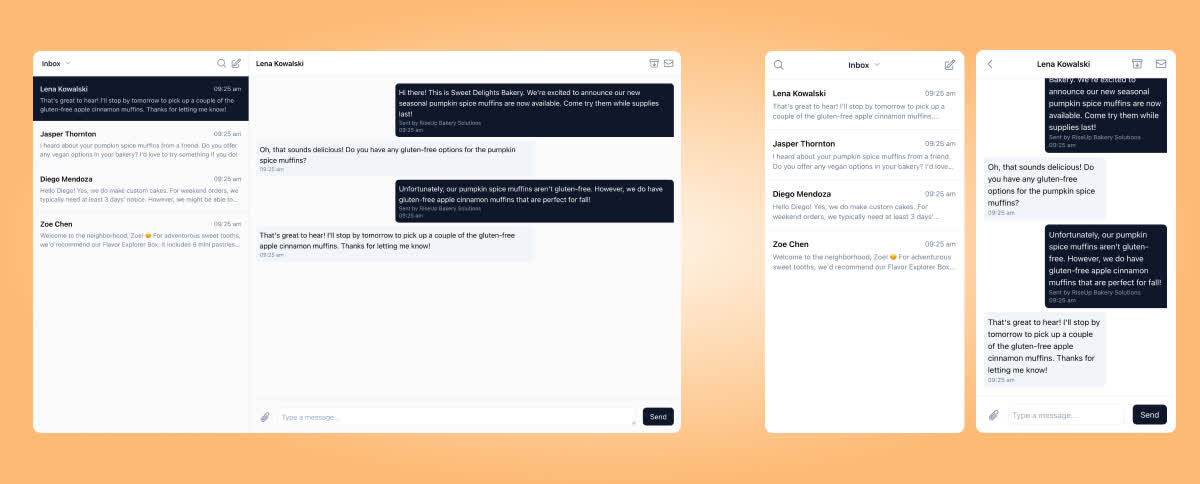
For many applications, this will be the only component you need to integrate to get started. It should be noted too that the component is fully responsive. If embedded in a narrow width sidebar for instance, it will collapse down to show a smaller mobile-style view.
Installation
The simplest version of the inbox component can be embedded like this:
<iframe
  src="https://embed.surge.app/conversations?user_id={SURGE_USER_ID}&token={ACCOUNT_TOKEN}&phone_number_id={PHONE_NUMBER_ID}"
></iframe>
Both {SURGE_USER_ID} and {ACCOUNT_TOKEN} are required parameters. You can find
them in the Surge dashboard. We will also be providing more robust auth options
in the near future.
The {PHONE_NUMBER_ID} parameter is optional. If provided, the inbox will only
display conversations associated with the specified phone number. This is
particularly useful for accounts with multiple phone numbers being used by
different groups of people.
Events
The Inbox component emits events that you can listen to in your application. Here are the events that you can listen to:
Conversation selected
When the user selects a conversation, this event is emitted with the details of the conversation:
{
  "source": "surge-inbox",
  "type": "conversation-selected",
  "conversation": %{
    "id": "cnv_01jadpja6sen796q4wxygg5q78",
    "contact": {
      "id": "ctc_01jadpk0asfq599vt3pwn3he6x",
      "first_name": "Dominic",
      "last_name": "Toretto",
      "phone_number": "+18015551234"
    }
  }
}
Conversation deselected
When the user selects a conversation or begins a new one, this event is emitted with the details of the conversation that was previously selected:
{
  "source": "surge-inbox",
  "type": "conversation-deselected",
  "conversation": {
    "id": "cnv_01jadpja6sen796q4wxygg5q78",
    "contact": {
      "id": "ctc_01jadpk0asfq599vt3pwn3he6x",
      "first_name": "Dominic",
      "last_name": "Toretto",
      "phone_number": "+18015551234"
    }
  }
}
Filter changed
When the user selects an inbox filter, this event is emitted with the new selection.
{
  "source": "surge-inbox",
  "type": "filter-changed",
  "filter": "unread"
}
The filter will be one of inbox, unread, all, archived, or opt_outs.
Events accepted
The Inbox component also accepts events to provide basic controls for your application. Here are the events you can send:
Update composer
Update the content in the user's composer.
{
  "target": "surge-inbox",
  "type": "update-composer",
  "method": "replace",
  "text": "this should be the only text"
}
The method can be one of replace or append:
replacescraps any existing content and leaves just the included textappendadds the included text at the end of the existing text content